When preparing files for PCBA, the fastest way to avoid production delays is to provide a correct Centroid (Pick-and-Place) file.
This file defines where each SMD component is placed and how it is oriented, and in most cases, it can be generated in under one minute directly from your PCB design software.
At PCBasic, many PCBA delays we encounter are not caused by PCB design problems, but by missing or incorrect centroid files.
Below is the quickest and most reliable way to create one, based on the CAD tool you’re using.
What a Centroid File Actually Needs (Nothing More)
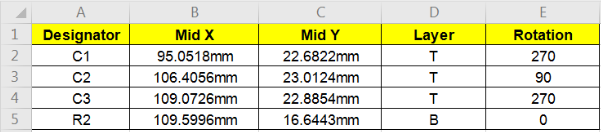
For SMT assembly, only these fields are required:
Reference designator (R1, C3, U7…)
X coordinate
Y coordinate
Rotation angle
Layer (Top / Bottom)
The file format itself is flexible. CSV, TXT, POS, MNT, or similar formats are all acceptable as long as the data is clear and consistent.
Fastest Ways to Create a Centroid File (By Software)
KiCad (Fastest – about 10 seconds)
1. Open the pcb_kicad file and go to File
2. Fabrication Outputs
3. Footprint Position (.pos) File
4. Generate File
When preparing files for PCBA, the fastest way to avoid production delays is to provide a correct Centroid (Pick-and-Place) file.
This file defines where each SMD component is placed and how it is oriented, and in most cases, it can be generated in under one minute directly from your PCB design software.
At PCBasic, many PCBA delays we encounter are not caused by PCB design problems, but by missing or incorrect centroid files.
Below is the quickest and most reliable way to create one, based on the CAD tool you’re using.
What a Centroid File Actually Needs (Nothing More)
For SMT assembly, only these fields are required:
· Reference designator (R1, C3, U7…)
· X coordinate
· Y coordinate
· Rotation angle
· Layer (Top / Bottom)
The file format itself is flexible. CSV, TXT, POS, MNT, or similar formats are all acceptable as long as the data is clear and consistent.
Fastest Ways to Create a Centroid File (By Software)
KiCad (Fastest – about 10 seconds)
1.Open the pcb_kicad file and go to file
2.Fabrication outputs
3.Footprint Position (.pos) File
4.Generate File

In the new window, select the output directory for the file and click Generate File. This will generate the necessary pick and place files.

At last, you can bundle these with the other assembly files and upload them to the PCBasic quote.
Altium
1.Open the .PCBDoc file
2.Assembly
3.Generates pick and place files

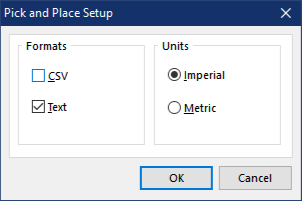
Depending on the Altium version you are using, you can choose which data fields to export in the Pick-and-Place file.
At a minimum, the file should include the designator, X/Y coordinates, and rotation.
Additional fields are not required.
The exported file will be saved in the same directory as the PcbDoc file.
Now you can upload these with the assembly file to the PCBasic quote.
Eagle
1.Open the board layout(.brd file)
2.Navigate to File
3.Click Export -> Mount SMD

Eagle will prompt you to save the Pick-and-Place files for the top and bottom layers separately.
The.mntfile contains placement data for the top side, while the.mnbfile is for the bottom side.
Simply include both files together with your other assembly files when submitting your PCBA order.
Sprint
There are 5 steps to output pick places from Sprint Layout software.
1.Click the Option
2.Then click the Components-Panel
3.Click the Export
4.Select the Exported Data
5.Click the Export
How PCBasic Reviews Centroid Files Before Assembly
During file review, PCBasic mainly checks the following basic items:
· Units are millimeters (mm)
· Top and Bottom layers are clearly defined
· Rotation values are present
If these points are correct, the centroid file is ready for production.
If you don’t have a centroid file, the fastest solution is to re-export it from the original PCB design file. For simple boards, PCBasic may provide assistance after reviewing Gerber and BOM files.
Still, need help? Contact Us : js@pcbasic.com
Need a PCB or PCBA quote? Quote now