
Global high-mix volume high-speed PCBA manufacturer
9:00 -18:00, Mon. - Fri. (GMT+8)
9:00 -12:00, Sat. (GMT+8)
(Except Chinese public holidays)





HomePage > Blog > Knowledge Base > Mechanical Keyboard PCB Assembly: Key Design, Assembly, and Testing Considerations
1. How a Mechanical Keyboard PCB Works
2. Components and Assembly Points That Need Extra Attention in Keyboard PCB Assembly
3. Hot-Swap, RGB, and Connector Assembly
4. Functional Testing for Keyboard PCBAs
5. Preparing a Keyboard PCB for Production
If you make a little mistake, it will leave one key non-functional or one LED in the wrong color. Worse, you will notice the defect when the product is in the consumer hand and that is a worse situation. Good keyboard PCB assembly requires professional skills, modern equipment and a strict inspection unit. You will read everything in very detail. It explains how hot-swap and RGB features are implemented and how to test and prepare boards for production.
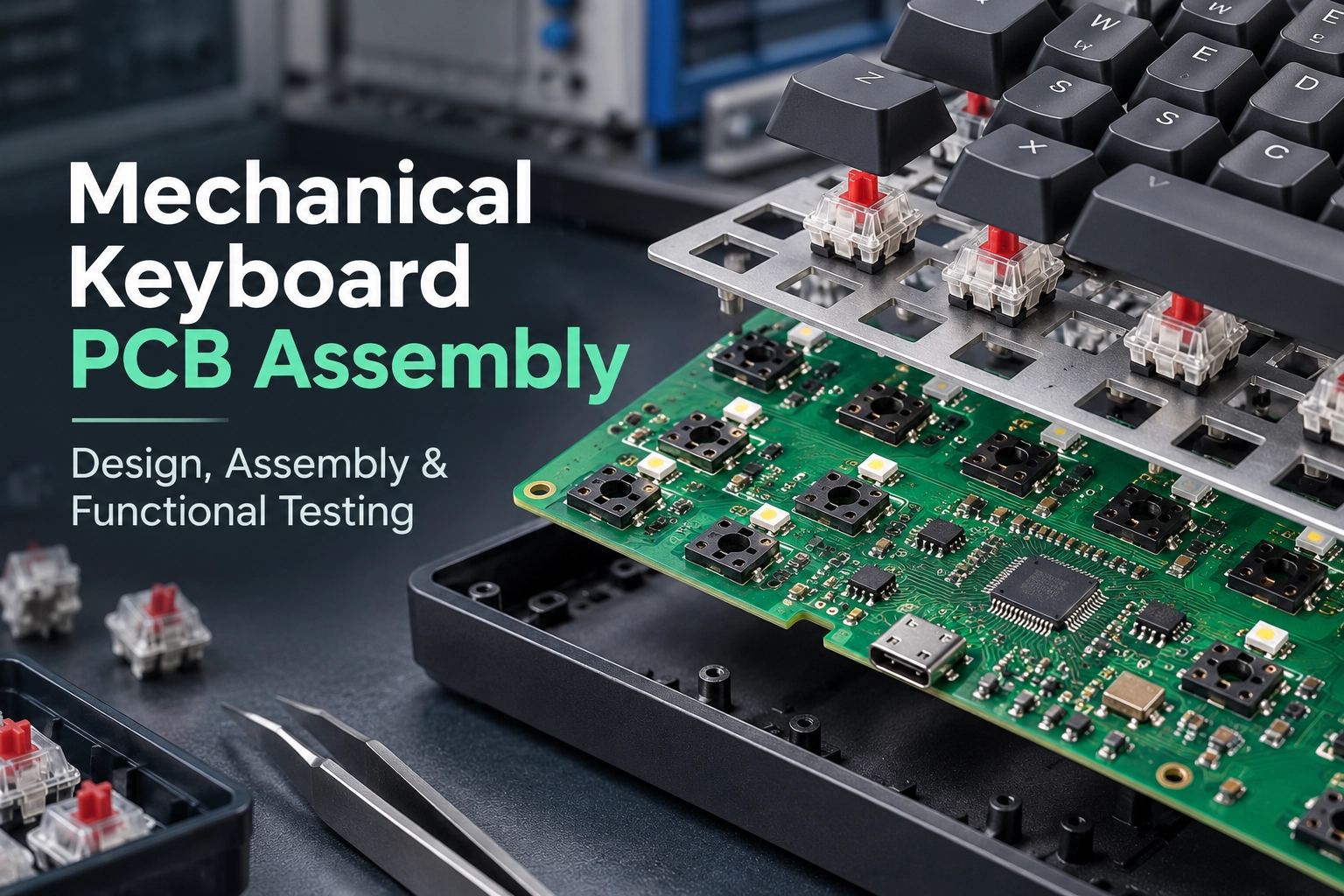
A mechanical keyboard PCB does not have a dedicated pin per switch. A full-sized board would need more than 100 pins, and that's too many. Instead, the switches are arranged on a grid of rows and columns.
The controller then cycles through the rows. For example, it sends a signal and scans the columns if there are any closed switches. Similarly, each switch is connected to a diode. Its function is to ensure the signal only comes back along the intended path. Without appropriate diode isolation, certain combinations of simultaneous key presses can create unintended current paths and cause ghost key registrations.
Many mechanical keyboard matrices use one diode per switch; without them, "ghosting" or false actuations of multiple keys becomes possible. The keyboard controller PCB houses the microcontroller unit (MCU), a crystal oscillator, and the firmware memory. Popular MCUs include the ATmega32U4, the RP2040, and the STM32 series. The firmware then programs the MCU to recognize switch actuations as keycodes.
A wired keyboard PCB typically includes a USB interface, such as a USB-C receptacle or a connection for a fixed USB cable, protective FPC connectors, and optimized routing for the USB differential pairs. Otherwise, a wired keyboard PCB is relatively straightforward. The high-speed differential pairs do require extra care during routing, though.
A wireless keyboard PCB assembly requires extra space for a 2.4 GHz radio, an antenna, a battery, and a charging circuit. The PCB also needs a low-power design since the battery should ideally last for months between charges. The USB-C connector may also provide wired data, charging, and external power for the keyboard.
An RGB keyboard PCB has a string of RGB LEDs fitted beneath the keycaps. The LEDs are typically addressable, meaning the controller drives each one individually. This requires more space on the board and higher current drain.
Many modern keyboards feature a combination of the three: a wireless board with per-key RGB, a rotary encoder, and hot-swap sockets. Each keyboard PCB assembly feature presents unique challenges during manufacturing.
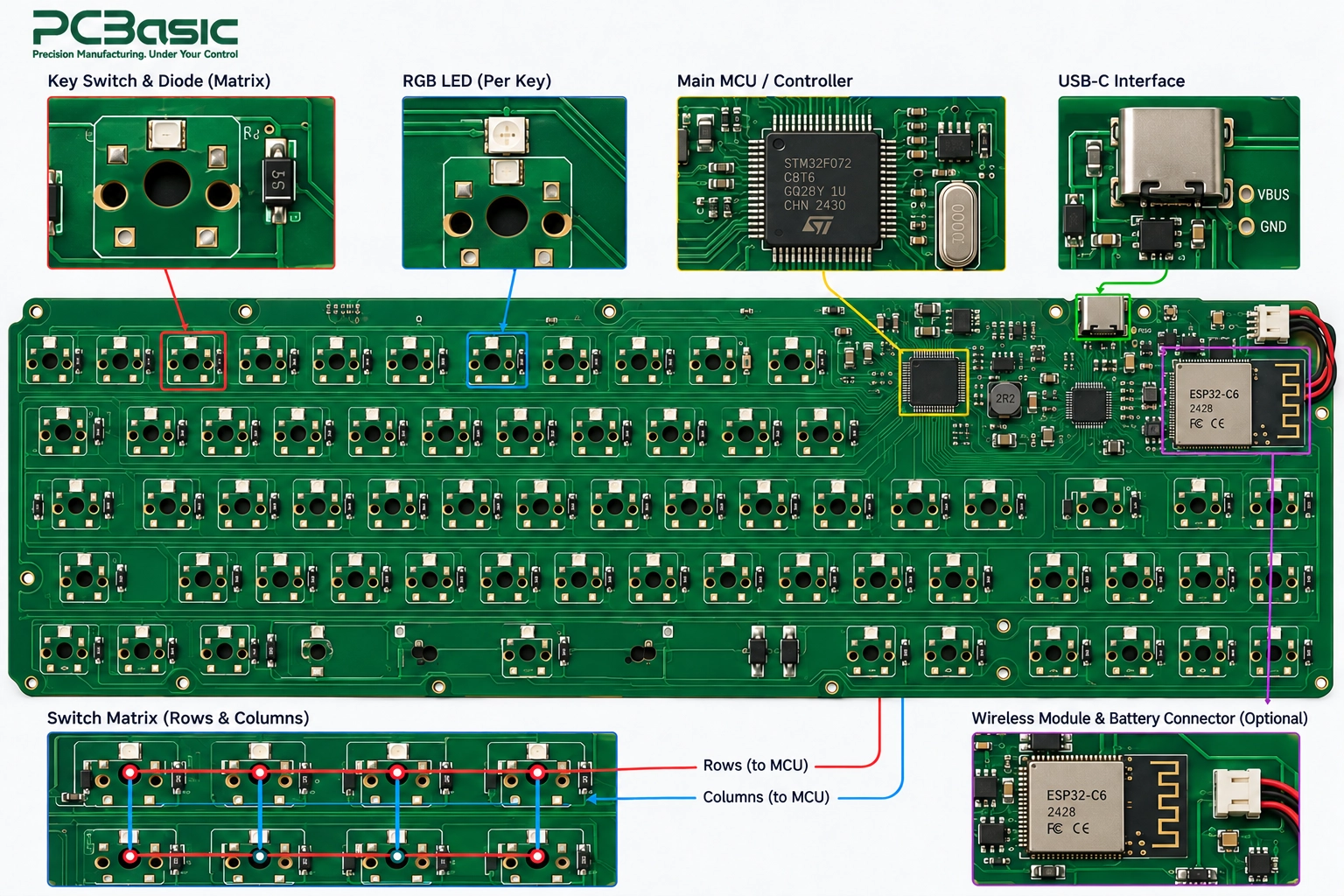
A keyboard PCB assembly is not entirely made of high-risk components. But understanding which parts are most likely to contribute to defects helps keyboard PCB assembly planning.
A full-size PCB layout has more than 100 switch positions, including the required diodes for each switch. Repetitive switch positions are the first potential source of defects in keyboard PCB assembly. One footprint misstep will propagate across all 100+ switches.
Switch diodes are also usually SOD-123 or SOT-23 packages: small, easy to miss, and prone to polarity errors. A misplaced diode renders the key non-functional and can be difficult to spot visually.
Solder paste printing is another concern for switch diodes. For instance, uneven deposits can cause tombstoning of small parts which is a serious concern. Good stencil design and process control prevent most solder paste defects, but they begin with a good footprint.
PCBasic takes advantage of SPI to detect abnormal solder paste volumes and locations before component placement. Finding a soldering defect after final assembly is much more time-consuming than detecting an abnormal solder paste deposit early with SPI.
The controller MCU packages also pose a challenge, particularly QFN and QFP variants. QFN solder joints are less accessible to direct visual inspection, while fine-pitch QFP leads require accurate paste printing, placement, and reflow control. A misaligned controller may also lead to unstable USB or I2C communication.
Crystal oscillators, decoupling capacitors, and ESD protection also need to be placed precisely relative to the controller. 0402 and 0201 sized components are also more challenging to place. Using precision pick-and-place machines and high-quality feeders helps avoid small-component misplacements.
Automated optical inspection after reflow helps identify these kinds of problems. AOI scans the board against the CAD data and flags any missing, misplaced, or flipped parts. First article inspection (FAI) also helps verify that the first assembled board matches the expected bill of materials (BOM).

Wireless keyboard PCB assembly introduces RF components to the mix. The RF matching network and the antenna are sensitive to soldering defects. Inappropriate handling can also decrease the range of a wireless keyboard.
Connectors also require extra care during PCB assembly. USB-C receptacles, battery connectors, and FFC sockets are subject to mechanical stress and require reliable solder joints. RF shield cans also must be placed precisely and not touch any board traces.
Process control and MES traceability ensure that each keyboard PCB manufacturing batch is reliable and repeatable. MES links each assembled circuit board to the reels and machines used during manufacturing. This helps identify the batches contributing to a field defect and is overall an essential aspect of high-quality keyboard PCB assembly.
Hot-swap sockets, RGB LEDs, and connectors account for most of the special considerations in mechanical keyboard PCB assembly. Each presents several challenges during PCB assembly.
A hot-swappable keyboard PCB assembly uses surface-mount sockets to allow switch replacements without soldering equipment. Each hot-swap socket requires a footprint on the PCB, and a full-size board will have more than 100 such footprints.
Each socket and switch footprint must align with the corresponding switch opening in the keyboard plate. Misalignments greater than 0.5 mm lead to binding and failure to seat a hot-swapped switch or damage to the switch pin. Accurate pick-and-place machine programming based on a good footprint helps avoid such issues.
The hot-swap sockets also require a good soldering profile. The thin contacts may delaminate under a too-hot reflow profile, and flux residues may lead to increased contact resistance. Testing each key during board power-up helps identify any hot-swap-related defects.
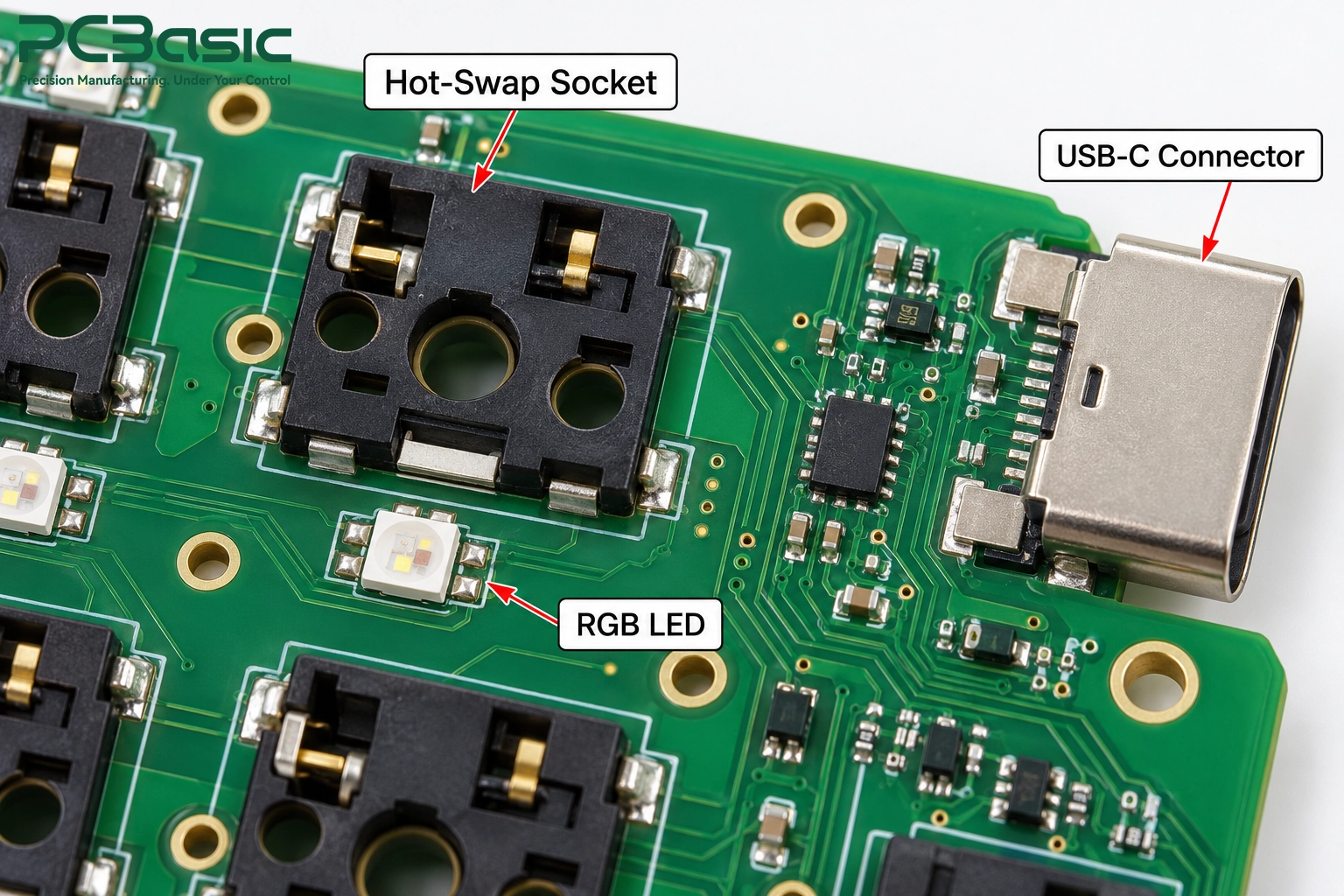
The addressable RGB LEDs used in RGB keyboard PCB assembly also present several challenges. The LEDs require a specific polarity and usually have a marker on the pin 1 side, which can be misaligned during assembly.
In daisy-chained addressable RGB designs, an incorrectly installed or failed LED can interrupt data transmission to downstream LEDs. Moisture-sensitive LED packages should be stored and handled according to their specified MSL, and baking may be required if the permitted floor life is exceeded. Moisture may also cause microcracks in the LED lenses during reflow.
AOI works well for misplaced RGB LEDs due to the easy-to-spot marker on the anode side. LEDs close to switch stems require good footprint design and inspection to avoid soldering defects. SMT assembly also helps avoid soldering defects compared to manual or THT assembly.
USB-C receptacle assembly is also a special process in keyboard PCB manufacturing. The USB-C receptacle has 16 or 24 signal pins on a fine pitch and large shell grounds on either side.
Rotary encoders, TRRS jacks, and some other connectors also use THT pins and can benefit from selective soldering and hand soldering techniques. Selective soldering also avoids thermal stress on nearby SMT components.
A good keyboard PCB may still require functional testing before being sent to the field. Functional testing ensures that the functionality of a keyboard PCBA matches the design.
Functional testing begins with a visual inspection and multimeter checks. Solder bridges and misplaced components or diodes become obvious in this step. A continuity check also reveals shorted power and ground.
The next step is to power the board with a current-limited power supply and observe the current draw. A board with a shorted power or a faulty LED string will usually draw abnormally high current at power-up.
Flying probe testing also comes in handy for bare boards and first-article assemblies. Flying probe testing looks for any open or short circuits on the board without the need for a custom fixture. It is ideal for low-volume keyboard PCB assembly runs.
The next set of tests verifies the key matrix functionality. A test firmware loads to the board, and each key is tapped or each switch in a key jig is closed to verify that the controller recognizes the actuation.
Ghosting tests also look for accidental actuations when multiple keys are pressed at once. Another test verifies that the board is properly recognized by a host PC and responds within a reasonable timeframe.
ICT can be used to check component values, connections, opens, shorts, and assembly integrity at accessible test points. It uses a custom fixture to probe test points and verify board functionality at the component level. FCT (functional circuit testing) verifies whether the assembled board performs its intended functions under defined test conditions.
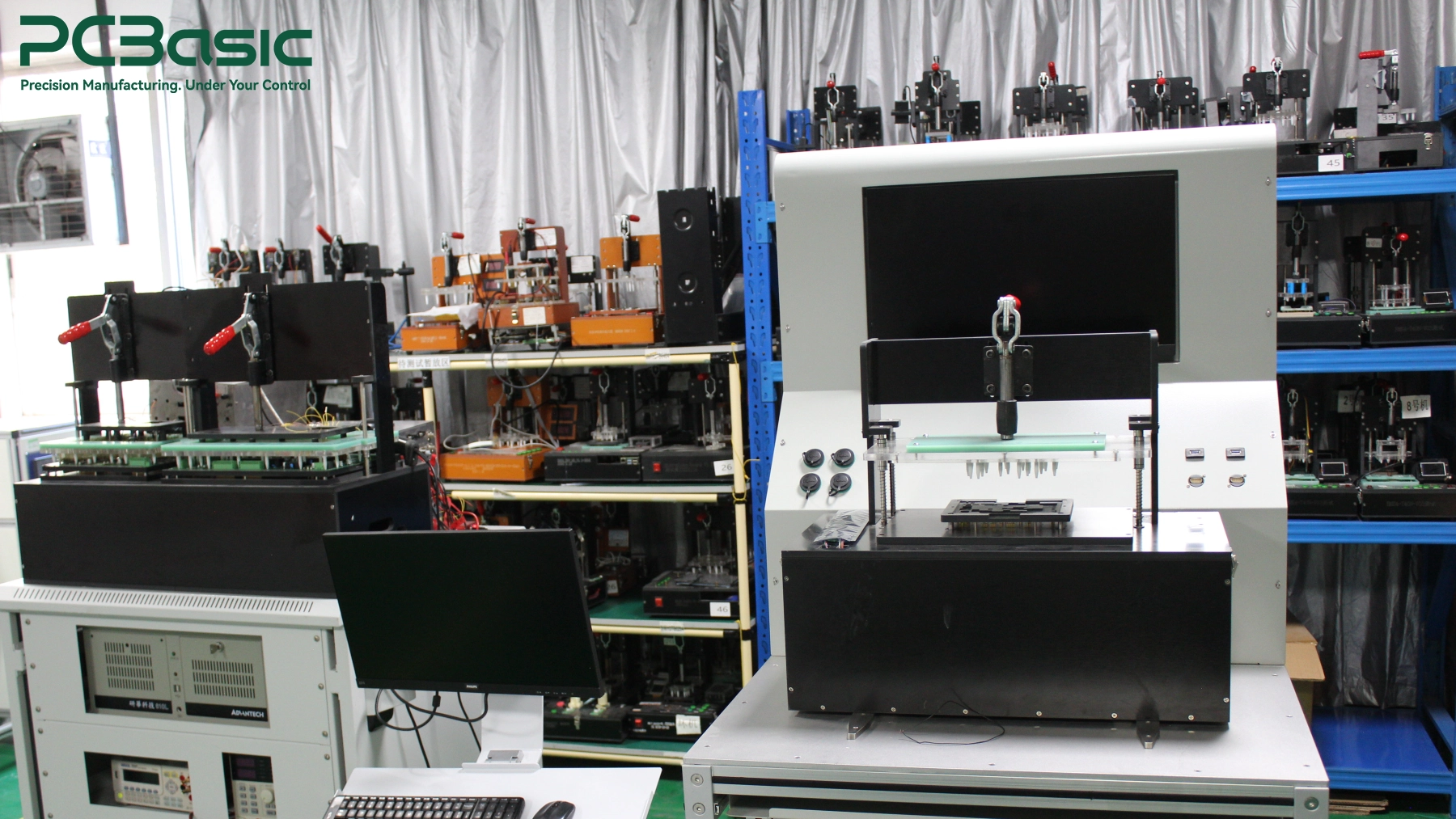
Testing RGB, encoder, and wireless functions involves a few special test steps. Testing an RGB LED string involves cycling through colors and checking brightness, color accuracy, and possible shorts or dead LEDs.
Encoder testing verifies turn direction and click functionality. Tests for hot-swap sockets verify that switches can be inserted and removed without issues. Wireless tests also look at pairing, range, battery charging performance, and current draw during sleep.
Testing a keyboard PCBA's functionality is essential to ensure that it performs as expected. PCBasic can implement FCT procedures into the manufacturing workflow and tie the test results to the serial number of each board.
Clear technical files save time during PCB assembly. For custom keyboard PCB assembly, provide Gerber files, a BOM with manufacturer part numbers (MPNs), a pick-and-place file, and an assembly drawing. Clearly indicate the polarity of LEDs and diodes and any empty footprint locations.
Specify the board thickness, material, and finish, and special considerations for the build-up. Include test procedures and firmware files if functional testing is necessary. Finally, include alternate parts for difficult-to-source components. Keyboard-specific components tend to have long lead times.
A prototype run is always a good idea before a larger volume production run. Five to twenty prototype boards usually suffice to root out footprint and fit issues as well as firmware bugs.
Verify switch fitment to the switch plate and enclosure. Check stabilizer position, USB-C accessibility, and LED position to keycaps. Schematic and design reviews do not always catch these kinds of issues.
After passing prototype tests, review the DFM (design for manufacturing) feedback and finalize assembly files. Once the files are locked, the production run can begin.
PCBasic offers turnkey, consignment, and partial sourcing options for your keyboard PCB assembly. You can also specify components and let the factory source the rest.

Good keyboard PCB assembly requires several standard practices. So, a well-planned matrix and component placement will reduce soldering and orientation issues on very first stage. Assembly of hot-swap sockets, RGB LEDs, and connectors also requires extra care. Finally, prototype testing and functional testing ensure that the PCB assembly meets design requirements.
PCBasic has the equipment and expertise to support each stage of keyboard PCB assembly. SPI, AOI, and X-ray inspection detect soldering defects. Mixed-technology assembly handles THT and fine-pitch SMT components. ICT and FCT verify board functionality, and MES traceability provides much-needed process control.
If you have a keyboard PCB ready to be assembled, send the files to the PCBasic team. We look forward to reviewing your technical files and compiling a set of recommended changes before your first PCB assembly run.
Q1: What is keyboard PCB assembly?
Keyboard PCB assembly is the manufacturing process for the circuit boards found in mechanical and membrane keyboards. The PCB houses the controller, diodes, switch sockets, LED string, and connectors. The finished PCBA is then tested and verified.
Q2: Is a hot-swappable keyboard PCB harder to assemble?
A hot-swappable PCB requires sockets instead of direct switch soldering. The sockets are taller and sensitive to soldering profiles. Overall, hot-swap PCB assembly is slightly more involved but still feasible with the right tools.
Q3: What testing does a keyboard PCBA need?
At minimum, a visual inspection, continuity check, and switch matrix test should be performed. Assemblies with RGB, encoders, or wireless features also need to be tested for those specific features.
Q4: Can PCBasic handle wireless keyboard PCB assembly?
PCBasic can build wireless keyboard PCBs with RF modules, antennas, and batteries. Functional test procedures also include verification of the wireless link and range.
Assembly Enquiry
Instant Quote

Phone contact
+86-755-27218592
In addition, we've prepared a Help Center. We recommend checking it before reaching out, as your question and its answer may already be clearly explained there.
Wechat Support

In addition, we've prepared a Help Center. We recommend checking it before reaching out, as your question and its answer may already be clearly explained there.
WhatsApp Support

In addition, we've prepared a Help Center. We recommend checking it before reaching out, as your question and its answer may already be clearly explained there.
